top of page


File Encryption Mode Demonstration
錨點 1
Open encryption, modify encryption, smart encryption, and no encryption are the most in the industry.
Open encryption--Solidworks affiliated to R&D and drawing, used by AutoCAD
Modify encryption--used by Solidworks and AutoCAD, which are affiliated to R&D and drawing
Smart Encryption - used by business and purchasing departments
No encryption - used by high-level executives and bosses

normal open

Open encryption--development and use
lock open file
With DVC installed, you can start editing
Without DVC installed, open garbled characters

gibberish
Smart Encryption--Business,
Used by the purchasing department

Unencrypted file opens, always unencrypted
Can open encrypted files and edit
Description of File Scan Encryption
掃描解密
加解密槽
File encryption and decryption slot
The built-in fast scan and encryption component of DVC will scan and encrypt according to the format content you set, and maximize the file encryption element.
Any format can be quickly encrypted, allowing you to protect data more flexibly.


Files are encrypted immediately
Decrypted after supervisor audit
The DVC application decryption engine can retain complete encrypted file data, and if the supervisor does not log in at the time of application, he can also obtain audit application information after logging in, making the overall operation more flexible, more realistic and full of detailed texture.
主管稽核解密
The DVC supervisor audit function can directly open the content of the original file, and back up one copy to the server, and another copy to the supervisor computer [set N days to automatically delete], it will be backed up according to the content you have audited, and the application action will be brought into full play to the extreme.


applicant screen
supervisor screen
supervisor screen
File Permission Settings
The DVC permission system automatically adds the reading permission of those departments to the file, so that you can more flexibly control the rights, responsibilities and protection of the file.
文件權限說明
The DVC authority system is open to the supervisor to automatically adjust the authority, and the power to add authority is only in the department that the supervisor can control, and the full authority is with you.

R&D file encryption
Automatically bring in reading permission

supervisor can adjust
Which department is this document for?
File Scan Encryption
文件備份
File scanning and encryption can be performed smoothly while personnel are working, and this function is only required when importing DVC for the first time, because the files have been modified/opened and encrypted in the future, so there is no need to scan and encrypt them all the time.
file backup mechanism
The only thing that can be done is a full backup of computer data. Background backup, differential backup, and FTP backup can effectively prevent ordinary personnel from accessing important data.
Import DVC for the first time
Encrypt all historical files

Desktop watermark
上傳網頁解密
錨點 2
Upload webpage decryption/download webpage encryption
every page counts
It’s safe, don’t worry
The company has a variety of compliant web services. DVC can upload this web page to decrypt it, and download it from this web page to encrypt it immediately, which is fully protected.


Critical value
mass delete, mass copy
With DVCˊ6, Threshold System's "Warning Notification" allows you to see at any time, even if you are not on site, you can see "Bulk Copy to USB", "Print" or decrypt too many files.
DVC'6, the "alarm notification" of the threshold system has newly added early warning functions such as [mass deletion] and [mass copy] to ensure that the status of company files can be known and protected early
臨界值
大量刪除


User is actively banned from this action
MIS immediately received the warning letter
offline computer control
離線電腦管制
自行添加軟體
You can add encryption formats and software by yourself
DVC's policy has been specially processed to maintain the encryption effect even when it is offline, and even if the computer is lost or the staff leaves suddenly, the encrypted text of the computer can no longer be opened after a certain period of time.
DVC allows MIS to add encryption formats and software by itself, ensuring that all kinds of software can be encrypted and used in DVC protection, and there is no need to entrust the original factory to add and pay.


USB management
USB管理
USB certification
Use the Kernel layer to control USB usage, greatly improving durability.
In addition to general prohibition and permission, our USB control can also bring about the effect of encrypting and decrypting files, further improving the security of USB use, and will never change the behavior of USB use.
Certified USB
Certified USB can be used, other USB cannot be used


Documentation
Host backup and restore
文件紀錄
DVC file records, use the Kernel layer to record the actions of adding, deleting, modifying, renaming, copying, printing, copying USB, etc. of each file, without affecting the performance of the computer, so that no matter what you do, it will be executed silently in the background It's documented.
When the host computer is severely damaged, DVC can instantly restore the settings and organization list to the backup for you.


Outgoing articles
USB Agent
USBAGENT
DVC USB client adopts DVC installation-free client and provides external manufacturers with an option to open the file. To open the USB, you need to type the password first, so that the overall security is improved.


The user's encrypted files are directly sent to the manufacturer
The manufacturer plugs in the USB and enters the password
Can directly edit encrypted text
Always keep encrypted
USB Agent Application 2
Enterprise design drawings are all encrypted, and when they are delivered to the owner, the encrypted text will also be kept.
The decryption area can be specially designed for the owner's USB Agent, so that the owner can decide to decrypt by himself

DVC VIEWER
閱讀器
The converted file can be provided to external manufacturers to open by converting the format and bringing in the following control items.


安裝用戶端
install client
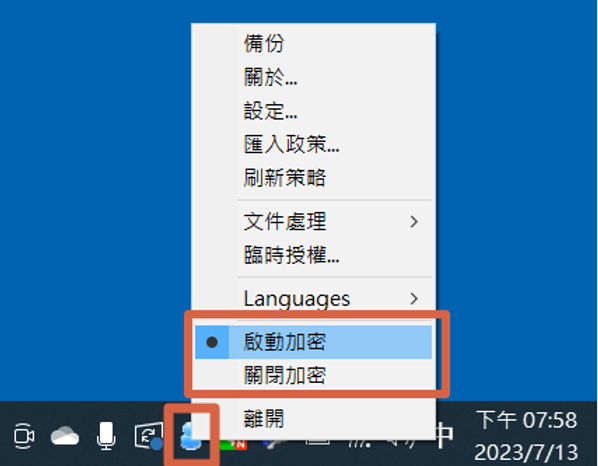
Companies that use DVC can safely send encrypted files to external manufacturers. After the manufacturer installs DVC, when they need to open encrypted files, they can directly select [Enable Encryption], and then they can open or edit encrypted files. And the files can be edited in an encrypted environment and sent back to the personnel of the DVC company.
When the DVC company’s project is finished, the external manufacturer can select the encryption as [Encryption off], and at this time, the related encrypted files of DVC can no longer be opened.

ONLINE VIEWER
It can prevent mistaken or missed sending of files. In case of mistaken sending, it can be withdrawn immediately. The use of files is within a certain authority. When displaying files, it can display watermarks, who is currently opening them, time, IP, etc., and send out In addition to viewing the file on the computer, it can also be opened on the mobile phone or PAD, and the usage status of the file can be tracked. This is the DVC supplier platform
供應商平台


The user's encrypted files are directly sent to the manufacturer
The manufacturer plugs in the USB and enters the password
Can directly edit encrypted text
Always keep encrypted
Example of opening a file on the ONLINE VIEW
Open the file on the mobile phone, first type the password

Display the relevant content of the watermark record

The computer opens the file is also very beautiful

bottom of page